

Last month, I wrote about eleven lessons I wish I had learned earlier in my career. I kept thinking about that article after it was published because there were still several audio lessons I had left out. Most of them are the kinds of things that seem obvious only after you have learned them the hard way.
Audio has a way of humbling you. You can spend hours programming a control system, building a polished user interface, and making every source switch exactly as designed. Then someone walks to the front of the room, taps the microphone twice, and says, “Is this thing on?” Suddenly, none of the other work matters.
This is not meant to be an advanced guide to audio engineering. It is more of a second chapter about the things newer technicians should learn early and the things experienced technicians occasionally need to relearn. I still find myself going back to these basics when a room is not behaving the way I expect.
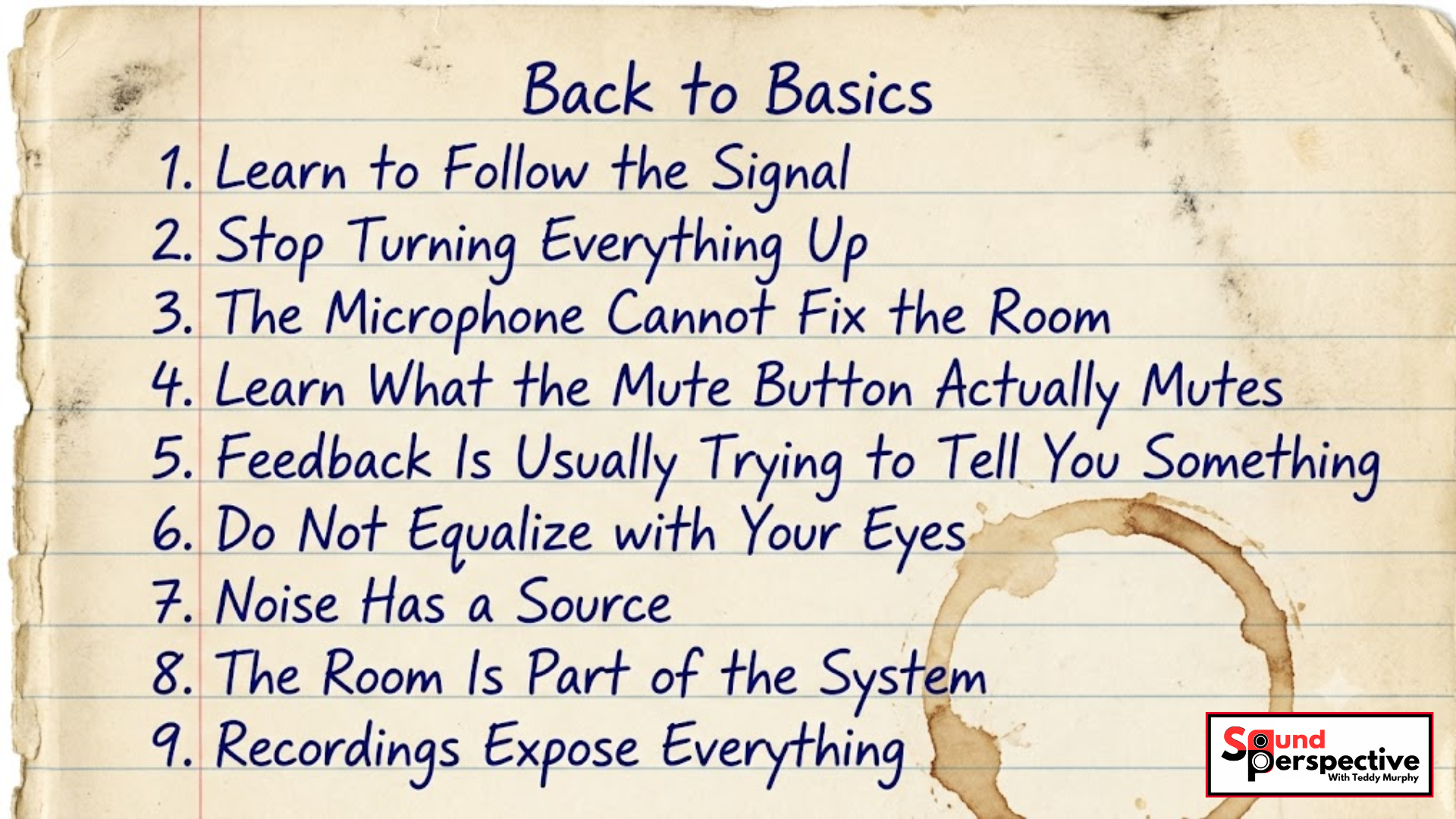
1. Learn to Follow the Signal
When I first started working with AV systems, I sometimes treated the room like one big piece of equipment. Something was not working, so I started checking everything. That is an exhausting way to troubleshoot, and it usually creates more confusion than answers.
Audio becomes much easier once you stop looking at the entire system and begin following one signal. Start at the source and work forward. Where does the signal go next? What device receives it? Where is it routed? Where is it processed? What is the final destination?
In a basic system, that path might be a microphone, receiver, DSP input, processing stage, amplifier, and loudspeaker. A modern networked system may be much more complicated, but the thought process does not change. You are still trying to find the last place where the signal was good.
I have watched people replace cables, reboot control processors, and blame amplifiers when the microphone receiver was muted. I have also been that person. Following the signal keeps you from taking a random walk through the equipment rack and hoping to stumble across the problem.
2. Stop Turning Everything Up
The first instinct when audio is too quiet is usually to turn something up. When that does not solve the problem, the next stage gets turned up too. Before long, the amplifier is louder, the room has more hiss, feedback is closer, and the system behaves differently depending on which source is being used.
Gain structure was one of the first audio concepts I heard people discuss and one of the last I truly understood. It is not about finding one magical setting. It is about making sure every part of the signal chain receives a healthy level without being overloaded.
A weak microphone signal that gets heavily boosted later is still a weak microphone signal. You are often raising the noise along with it. On the other hand, driving the front end too hard can create distortion that no amount of adjustment later in the signal path will repair. Once the signal is clipped, it is clipped.
I learned more about gain structure by watching meters than by reading definitions. Put audio into the system, look at the input, and watch what happens at each stage. See where the level rises, where it drops, and where it starts to run out of room. Listen while you do it. Those meters are telling the story of what is happening inside the system.
3. The Microphone Cannot Fix the Room
We occasionally expect a microphone to perform miracles. We mount it too far away, aim it poorly, place it near a noisy air vent, and then try to correct everything inside the DSP. A little processing turns into a lot of processing, and before long the microphone sounds as though the person is speaking through a cardboard tube.
The closer you can get the microphone to the person speaking, the better your chances usually are. That does not mean every classroom needs a handheld microphone six inches from the instructor’s face. It means distance matters, coverage matters, and placement matters.
I have worked in rooms where moving a microphone a few feet accomplished more than an hour of adjusting filters. That is not always the answer, of course. Faculty still have to use the room. Sightlines matter. Ceiling height matters. A microphone hanging in the ideal acoustic location may sit directly in front of a projector or block the view of a display.
AV design is full of compromises. The important part is understanding which compromise you are making and what it may cost you later.
4. Learn What the Mute Button Actually Mutes
Mute logic causes a surprising number of problems because the system can appear to be doing one thing while the audio path is doing something else. A touchpanel button may change color and indicate that the microphone is muted while audio is still passing. Another system may mute the reinforcement feed but leave the lecture capture feed active. A wireless transmitter may be muted while the receiver and DSP appear perfectly normal.
Those are three very different situations.
In higher education, we also have to think about confidence and privacy. When an instructor presses mute, they expect the microphone to be muted. They do not care whether that command muted an input, an output, a crosspoint, or a transmitter. They care that the conversation they are having is no longer being amplified or recorded.
That is why mute should always be tested through the entire path. Seeing a button change from green to red is not enough.
5. Feedback Is Usually Trying to Tell You Something
Feedback is not the system deciding to ruin your event. It is the system showing you that the relationship between the microphone, loudspeaker, room, and gain is no longer working.
The worst feedback incident I ever experienced was not caused by a defective microphone or a failed DSP. A microphone was placed in front of a loudspeaker, the system level had been raised to compensate for poor placement, and someone walked directly into the worst possible spot. The room took off.
Anyone who has experienced that sound in front of a crowd remembers how quickly every head turns toward the AV table.
Equalization can help gain some stability, but EQ is not a replacement for sensible microphone and loudspeaker placement. Sometimes the right answer is moving the microphone. Sometimes it is changing the loudspeaker level. Sometimes the system is simply being asked to produce more volume than the room can support.
Ringing out a room is useful, but understanding why the room is ringing is far more valuable.
6. Do Not Equalize with Your Eyes
DSP software makes it tempting to create beautiful-looking EQ curves. A smooth slope looks intentional. A symmetrical set of filters looks professional. Neither guarantees that the system sounds good.
Use your ears, but understand their limitations too. After listening to the same problem frequency for several minutes, you can become so focused on it that everything else disappears. Step out of the room. Come back. Play familiar material. Listen from more than one seat.
A classroom does not have only one listening position. The system that sounds excellent at the instructor station may be harsh in the front row and barely intelligible under a balcony.
Measurement tools are valuable, but the graph is not the student sitting in the back of the room. At some point, you have to walk the space and listen.
7. Noise Has a Source
A buzz does not simply mean bad audio. It means something is wrong somewhere, and the difficult part is resisting the urge to blame the first device you recognize.
Disconnect pieces of the signal chain one at a time. Listen to whether the noise remains when the source is removed. Check whether it disappears when a laptop power supply is unplugged. Determine whether it is present on every input or only one. Pay attention to whether it changes when the lighting system or another piece of building equipment is operating.
I once chased an audio issue through a rack because the noise sounded like a grounding problem. The rack was fine. The issue appeared only when a particular laptop was connected to power.
That experience stayed with me because I had already decided what the problem was before I finished testing it. Troubleshooting gets faster when you stop trying to prove your first guess and start trying to disprove it.
8. The Room Is Part of the System
We talk about microphones, DSPs, amplifiers, and loudspeakers because those are the pieces we can order, install, configure, and replace. The room is harder.
Glass, concrete, high ceilings, parallel walls, HVAC noise, movable partitions, and seating layouts all affect what people hear. None of those problems disappear because the loudspeaker has an impressive specification sheet.
Some rooms need acoustic treatment. Some need different loudspeaker placement. Some simply need realistic expectations. I have been in spaces where the request was essentially, “Can you make this sound less echoey without changing anything about the room?” The honest answer was no.
We may be able to improve it. We may increase intelligibility, reduce reflections in certain areas, or add fill speakers where coverage is weak. However, the room still gets a vote.
This matters in higher education because many AV spaces were never designed to be AV spaces. A multipurpose room may host a lecture in the morning, a banquet that evening, and a board meeting the next day. The system has to survive all three, even when none of them represents the ideal acoustic use of the room.
9. Recordings Expose Everything
A room can sound acceptable in person and terrible on a recording. People sitting in the space hear the loudspeakers, the natural voice of the instructor, and the acoustic energy around them. The recorder hears only what you send it.
That difference becomes obvious when a class is played back later. A microphone that seemed good enough in the room may sound distant and hollow online. An aggressive gate may cut off the beginnings of sentences. A poorly managed mix may make student questions disappear.
Check recordings with headphones. Check them away from the classroom. Listen the way a remote student will listen.
I have made adjustments that sounded perfectly reasonable while standing in the room and then changed them after listening to the recording at my desk. Neither listening position was wrong. They were simply revealing different parts of the system.
Lecture capture is not just another output. It is another audience.
Still Coming Back to the Basics
The longer I work in higher education AV, the less embarrassed I am to return to the fundamentals.
When a room is down and a class is waiting, I do not begin with the most complicated explanation. I check whether the microphone is on. I follow the signal. I look at the meters. I confirm the routing. I listen at the output. That approach is not flashy, but it works.
Audio systems have become more networked, more automated, and more capable than they were when I started. We now manage devices through browsers, route audio across the campus network, automate microphone mixing, monitor systems remotely, and build processing that would have required racks of equipment not that long ago.
Yet the basic questions remain. Where did the signal begin? Where was the last place it was working? What changed between there and here?
Sometimes advancing in this industry means learning a new platform, protocol, or piece of equipment. Sometimes it means going back to the basics and realizing they still have something to teach you.